
Finished pages need a real file
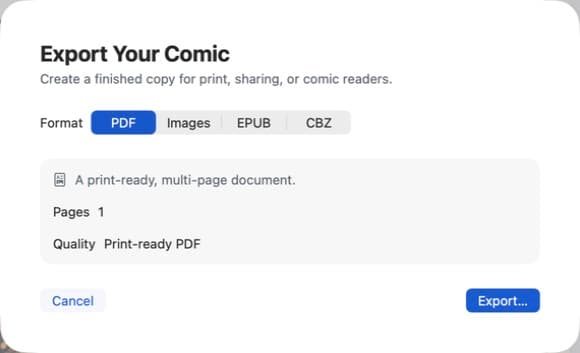
A photo comic on a Mac is only finished when someone else can open it. Screenshots of an editor are not a comic. Comic Zap 1.0 ships four export families so the same document can go to a printer, a reader app, or a chat thread.
Which format to choose
Use PDF when you need print, email, or a classroom handout. Parents, teachers, and clients already have a PDF app. Keep margins honest and proof the type size before you send it.
EPUB
Use EPUB when the comic should live in a reading app. It is a better traveling file than a folder of images, and it keeps the story in page order.
CBZ
Use CBZ when the audience uses comic readers. CBZ is the comic-book zip people expect in that world. If you are making an issue, not a flyer, CBZ is often the right sibling to PDF.
Images
Use images when you need a single panel, a web preview, or a social crop. Do not replace a multi-page PDF with a loose pile of screenshots if you still want a readable issue.
Keep the document local until you export
Comic Zap stores the working document on your Mac. Export is the moment you choose to share. That matters for classroom comics and family albums, where photos should not be sent to a cloud generator as a side effect of publishing.
A practical export checklist
- Read the comic once in the editor with balloons visible
- Check tails still point at the speaker after crops
- Export PDF and open it full screen
- Make a CBZ if you want a comic-reader copy
- Keep the Comic Zap document so you can revise later
The export panel is part of Comic Zap 1.0. Richer publishing is on the 1.1 roadmap. Until then, PDF, images, EPUB, and CBZ already cover print, web, and readers.
Make the next page on Mac.
Get Comic Zap